Tuesday, 26 April 2016

How To Use Progress Bar With Ajax Request Jquery


Use The Code Below To Have Progress Bar with %age Complete For Fetching Data

Preview Of Jquery Ajax Loader
HTML CODE 

<div id="progressbar">
    <div class="progress-label">Loading...</div>

</div>

CSS CODE

.progress-label {
    float: left;
    margin-left: 50%;
    margin-top: 5px;
    font-weight: bold;
    text-shadow: 1px 1px 0 #fff;

}

Javascript / Jquery Code

  $(function () {
      var progressbar = $("#progressbar"),
          progressLabel = $(".progress-label");

      progressbar.progressbar({
          value: false,
          change: function () {
              progressLabel.text(progressbar.progressbar("value") + "%");
          },
          complete: function () {
              progressLabel.text("Complete!");
          }
      });

      function progress() {
          var val = progressbar.progressbar("value") || 0;

          progressbar.progressbar("value", val + 1);

          if (val < 99) {
              setTimeout(progress, 100);
          }
      }

      setTimeout(progress, 3000);

  });
Thursday, 14 April 2016

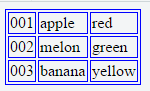
Convert Json Array To Table Format in AngularJS


The Following Code will Split Json Array Into Tabulated Format with Rows

HTML CODE

<div id="div1">
</div>

CSS CODE

#mytable,td{
    border:1px solid blue;
}

Javascript Code

var obj=[
    {
        id : "001",
        name : "apple",
        category : "fruit",
        color : "red"
    },
    {
        id : "002",
        name : "melon",
        category : "fruit",
        color : "green"
    },
    {
        id : "003",
        name : "banana",
        category : "fruit",
        color : "yellow"
    }
]
var tbl=$("<table/>").attr("id","mytable");
$("#div1").append(tbl);
for(var i=0;i<obj.length;i++)
{
    var tr="<tr>";
    var td1="<td>"+obj[i]["id"]+"</td>";
    var td2="<td>"+obj[i]["name"]+"</td>";
    var td3="<td>"+obj[i]["color"]+"</td></tr>";
 
   $("#mytable").append(tr+td1+td2+td3);

}

Output Image


Friday, 4 March 2016

How To Fix Call to undefined function apache_get_modules()


Fatal error:  Call to undefined function apache_get_modules() in
apache_get_modules() is only available when the PHP is installed as a module and not as a CGI. This is the reason why you cannot use this function and suffering from the error . The other reason would be caused by the disable_functions directive in your php.ini . you can use the following written php code to check whether rewrite module is enabled or not in your case while using CGI server API

<?php
if (is_mod_rewrite_enabled()) {
  print "The apache module mod_rewrite is enabled.<br/>\n";
} else {
  print "The apache module mod_rewrite is NOT enabled.<br/>\n";
}

/**
 * Verifies if the mod_rewrite module is enabled
 *
 * @return boolean True if the module is enabled.
 */
function is_mod_rewrite_enabled() {
  if ($_SERVER['HTTP_MOD_REWRITE'] == 'On') {
    return TRUE;
  } else {
    return FALSE;
  }
}
?>

To Check whether you are running Php Under CGI or Apache you can use procedure below
Create a check_phpinfo.php file and Write PHP Code Written Below -
<?php

// Show all information, defaults to INFO_ALL
phpinfo();

?>
Then the file and Navigate to Url like - www.example.com/check_phpinfo.php and It will show you php file in server
In Four line you can see "Server API CGI/FastCGI" That Denotes you are using PHP under CGI / Fast CGI

Saturday, 27 February 2016

Freedom 251 Announced Cash on Delivery


Ringing Bells president Ashok Chadha announced that the Rs 251 (less than $4) "Freedom 251" smartphone customers will now be required to make payment only when the smartphone is delivered to them.

The company plans to give 25 lakh handsets in the first phase before June 30.

It received 30,000 orders on the first day and rest of the customers will be selected via first-come-first-serve basis as it received a mammoth over seven crore registrations.

Saturday, 28 November 2015